On-Brand Campaigns,
Composed in Minutes
The Drag & Drop editor lets anyone on your team ship production-ready campaigns — without writing code and without waiting on designers. Every layout runs on your Email Design System, so brand guardrails are always locked in place.

 Optimized
(42 KB)
Optimized
(42 KB)
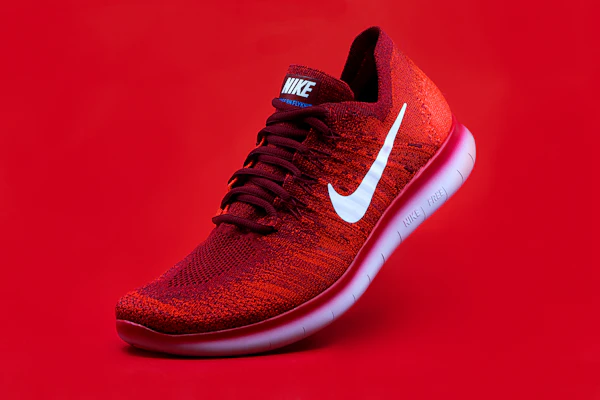
The All-New Endurance Run
Engineered with ultra-responsive dual foam for all-day comfort.


High-velocity creation, zero brand drift
Most email editors force an impossible compromise: lock templates down so tightly that nothing looks like it belongs to the brand, or hand over an open canvas that leads to broken code and rogue styling. Alpaco eliminates the dilemma with a modular Email Design System: marketers compose campaigns with pre-approved blocks within a locked brand frame, ensuring every email shipped is 100% on-brand.
Modular drag-and-drop
Pick components directly from your design system — heroes, multi-column product grids, editorial quotes, and CTAs. Reorder with a natural drag, with zero HTML required.
Locked brand frame
Essential structural assets like master headers, brand logos, and legal compliance footers remain securely locked. Marketers focus on composing campaign blocks in the canvas without any risk of altering company disclaimers or master navigation.
On-brand by default
Typography scales, responsive padding intervals, button stylings, and approved color palettes are baked directly into each modular block. Marketers get speed and autonomy, while the design team maintains total brand integrity.
Purpose-built controls for every component
Say goodbye to confusing style sheets and fragile CSS panels. Each modular block surfaces only the exact content fields, layout variants, and brand tokens it needs — making campaign production lightning fast, foolproof, and enjoyable.
Inline rich text
Click directly on headings, paragraphs, and CTAs on a block. Type and format with live preview.
Variants & toggles
Switch column presets, flip image alignments, or toggle badges and secondary CTAs with simple switches.
Brand-locked palettes
Color options are restricted to your approved design tokens — eliminating rogue hex values entirely.
Repeatable groups
Product grids, article digests, and agendas — add, duplicate, reorder, or delete items with 1 click.
Smart image optimization
Drop in raw photography; Alpaco auto-crops to aspect ratios and compresses for lightning-fast delivery.
Subject & preheader
Craft envelope copy directly in the campaign workspace with real-time character count guidance.
Save your favorite blocks for instant reuse
Not every great idea needs an entire email template. When you or a colleague craft a standout product callout, an engaging founder sign-off, or high-converting promotional copy, save that individual block directly to your personal profile. Build a private library of your go-to components and drop them into future campaigns with a single click.
Save custom copy & styling presets
Found the perfect phrasing, layout toggle, or CTA styling? Save the block with your exact text, variant settings, and formatting preserved without creating a whole new template.
Keep the Email Design System pristine
Personal saves live in your own profile instead of cluttering the shared template blocks for everyone else. Your core Email Design System stays clean and canonical, while you keep instant access to your favorite variations.
Instant access from your personal drawer
Your saved blocks live directly inside the editor's component panel. Drop them into any draft with a single click while remaining 100% compliant with your global Email Design System.
Borrow & adapt blocks from others
Spot an impactful guarantee block, testimonial quote, or promo layout created by someone else? Save it directly to your profile library and adapt it for your own upcoming sends.

Searchable media library with automated multi-block cropping
Never resize images manually in Photoshop, chase lost files in shared drives, or paste fragile external links that break in inboxes. Alpaco's Centralized Asset Manager gives your team a searchable library where you upload 1 master image once—and the platform automatically crops and optimizes it to fit any modular email block.
1 Master image, automatic multi-block cropping
Upload high-resolution photography once. When dropped into a 16:9 hero banner, 1:1 product grid, or 3:4 editorial portrait block, the platform automatically crops and adapts the image to fit the block's locked dimensions without distortion or manual editing.
Instantly searchable brand repository
Find the exact asset you need in seconds. Full-text search across image filenames, custom tags, campaign collections, and SKU numbers right from the editor sidebar—keeping marketers in creative flow.
Automated format conversion
Every image crop is automatically stripped of bloated EXIF metadata, converted into next-gen WebP/AVIF formats, and delivered via global edge CDN with sub-50ms latency for ultra-fast inbox load times.
1-Click in-editor insertion
Browse your organized brand collections and insert imagery straight into active blocks without copying URLs or toggling browser tabs.
Zero collisions with flexible session locking and version history
Simultaneous editing shouldn't mean overwritten copy or lost progress. Alpaco lets organizations toggle between real-time team collaboration and exclusive single-user locking—backed by a complete version history so every iteration is attributed, auditable, and easily restored.
Collaborative editing mode
Accelerate campaign delivery by allowing copywriters, designers, and marketers to build inside the same email simultaneously. Teams create together in real time without conflicting overwrites, coordination bottlenecks, or waiting around for handoffs.
Single user editing mode
Maintain strict quality control, compliance, and clear accountability by granting exclusive editing rights to one person at a time. Ideal for regulated industries and strict approval workflows, eliminating accidental changes while stakeholders follow along with live view-only access.
Version history
Every saved version records who made the change and when it was saved. Open a live preview of any historical version to inspect past iterations, and restore it with a single click.
What you see is what your recipients see
Stop sending test emails to your personal inbox just to see if a button broke. The Drag & Drop canvas renders in real time without refreshing, giving you instant confidence across every screen size.
Desktop & mobile viewports
Switch between desktop and mobile viewports with one click. Verify typography scaling, image stacking, and tap targets instantly.
Zero-delay WYSIWYG
Every copy edit, image swap, and color choice reflects in milliseconds. What you see inside the Alpaco editor is precisely what displays in subscriber inboxes.
Clean code inspector
Need to audit under the hood? Inspect generated table structures and Liquid logic tags anytime before syncing to your email service provider.
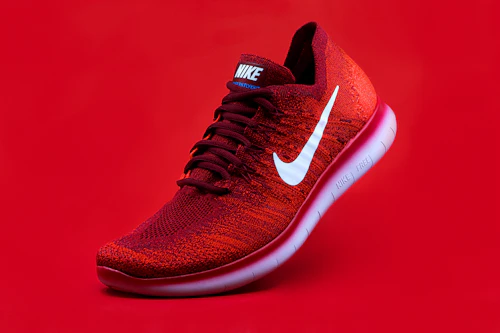
Summer Endurance Series
Lightweight mountain trail sneakers built for distance.


Built for Fast, Frustration-Free Creation
Every tool, gesture, and control is engineered to keep marketers in creative flow with zero design system drift.
Modular Drag & Drop
Drop pre-approved heroes, product grids, and CTAs into place with natural, frictionless canvas snapping
Locked Brand Frames
Design tokens, fonts, and responsive spacing stay locked into every block to prevent brand drift
Save a Block
Save standout copy, custom variants, or favorite modules to your personal profile library for 1-click reuse
Session Locking
Toggle between real-time collaborative editing and exclusive single-user locking to match your team's governance model
Version History
Track every save with clear author attribution, full visual previews, and 1-click instant rollback